Where would you like to receive your orders?
Compra en USA
desde donde estés

Lives
desde USA

Pagos
internacionales

Envíos a
+180 países

Compra
protegida
- Compra en la tienda Haz tu pedido directamente en el sitio del vendedor.
- Envíalo a tu dirección MyDeal Usa tu dirección MyDeal en Estados Unidos al finalizar la compra.
- Recíbelo en tu país Cuando recibamos tu paquete, solicita el envío internacional desde tu cuenta.
La transmisión se abrirá fuera de MyDeal.
¿Cómo quieres comprar?


La transmisión se abrirá fuera de MyDeal.
- Compra en la tienda Haz tu pedido directamente en el sitio del vendedor.
- Envíalo a tu dirección MyDeal Usa tu dirección MyDeal en Estados Unidos al finalizar la compra.
- Recíbelo en tu país Cuando recibamos tu paquete, solicita el envío internacional desde tu cuenta.
La transmisión se abrirá fuera de MyDeal.
Elige una tienda y compra en privado con un shopper experto.


 |
 |
 |
 |
 |
 |

















[varias_funct_iframe_compras_privadas_streamers]
0% comisión.
Envíos express de Dinero USA – MX
0% comisión.
✅ Deposito a cuenta bancaria del beneficiario en minutos.
✅ Opción de Retiro directo en cajeros Banorte 24/7
✅ Horario de atención a clientes extendido 9 am – 1am 365 días del año.
De acuerdo, realiza tu envió mediante transferencia a través de las siguientes opciones:
- Zelle: (956)-250-5436.
- Cash App: (956)-250-5436.
- Deposito bancario.
- Bank of America
- Nro. Cta: 4440 2590 1520
- Routing Number: 064000020
Al finalizar tu transferencia, por favor toma captura de tu comprobante y compártenoslo en este mismo WhatsApp.
Por favor agrega:
- Nombre completo del beneficiario.
- Banco y número de cuenta/tarjeta del beneficiario.
¡Listo! En minutos un asesor te contactara para procesar tu envió de inmediato, tu beneficiario lo verá reflejado en su cuenta en minutos o podrá recolectarlo en sucursal si así lo deseas.
Empieza gratis
Accede a los lives y comienza a comprar sin costo mensual.
|
FREE
6 beneficios incluidos · Sin costo mensual
|
|
|---|---|

|
Live Deals todo el año
Descubre ofertas y productos de USA en vivo.
|

|
Tu dirección en Estados Unidos
Recibe todas tus compras en un solo lugar.
|

|
Compras a tu medida
Encuentra lo que buscas con la ayuda de un personal shopper.
|

|
Compra protegida
Compra con respaldo si algo no sale como esperabas.
|

|
Alertas en vivo
Sigue a tus favoritos y entérate cuando comiencen su live.
|

|
Almacenamiento gratis
Guarda tus paquetes sin costo durante 15 días.
|
|
Crea tu cuenta gratis
|
|
|
Más popular
PLUSIncluye todo lo de Free + 6 beneficios premium. |
|
|---|---|

|
Compras online tax-free
Usa nuestra dirección en USA y ahorra sales tax.
|

|
Caza de ofertas en USA
Ofertas encontradas por shoppers verificados, solo para miembros Plus.
|

|
Comercios con membresía
Compra en Costco, Sam's Club y más sin membresía propia.
|

|
Consolidación optimizada
Reunimos y reempacamos tus compras para reducir espacio.
|

|
Cambios y devoluciones
Te ayudamos a gestionar el proceso cuando la tienda lo permita.
|
|
|
Almacenamiento extendido
Guarda tus paquetes sin costo durante 30 días.
|
|
Elegir Plus
|
|
|
Para negocios
BUSINESS
Incluye todo lo de Plus + 6 beneficios
para negocios. |
|
|---|---|

|
Compras por volumen
Accede a pallets, liquidaciones y compras mayoristas en USA.
|

|
Abastecimiento en China
Compra en China con shoppers y almacenes locales.
|

|
Tarifas preferenciales de envío
Obtén mejores tarifas según el volumen de tus envíos.
|

|
Consolidación internacional
Consolida compras en USA, China y Europa para enviarlas a tu destino.
|

|
Abastecimiento en Europa
Compra en Europa con shoppers y almacenes locales.
|

|
45 días de almacenamiento
Guarda tus paquetes sin costo hasta 45 días.
|
|
Elegir Business
|
|
Cómo funciona


Paola M.
La verdad pensé que comprar en tiendas de EE. UU. sería complicado, pero mi shopper me ayudó en todo. Me mandó fotos antes de pagar y mi paquete llegó justo como lo pedí, súper recomendable.
Juan C.
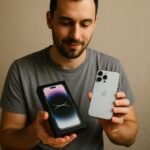
Hice una compra en Apple desde Colombia y me ahorré los taxes. Todo el proceso fue muy fácil y el shopper me mantuvo informado hasta que me llegó mi celular. Muy recomendado.

Valentina R.
Compré varias cosas en Ross desde mi casa. El shopper me mostró los productos por videollamada y eligió justo lo que quería. Todo llegó perfecto, lo volvería a usar sin

Sergio A.
La primera vez que compré en una tienda de EE. UU. desde Colombia estaba un poco nervioso, pero todo fue fácil. El shopper me guió paso a paso y el pedido llegó en el tiempo que me dijo. Ahora cada semana hago compras.

Carla Martínez
Me gusto poder elegir a mi shopper y ver cómo compraba en vivo. Los productos llegaron bien y justo como los vi en el Live.
Preguntas frecuentes
Todo lo que necesitas saber para comprar con MyDeal.
MyDeal te permite comprar en tiendas de EE. UU. y China, transmisiones en vivo de redes sociales y con personal shoppers desde una sola plataforma.
Puedes descubrir productos durante lives, comprar usando códigos rápidos de producto, consolidar compras de distintos servicios y recibir tus pedidos internacionalmente en tu país.
Puedes pagar de forma segura con tarjetas de crédito y débito nacionales e internacionales, además de PayPal.
Los pagos son procesados mediante plataformas globales como Stripe y PayPal para brindarte una experiencia rápida, protegida y compatible con compras internacionales.
Sí. MyDeal realiza envíos internacionales a más de 180 países.
También puedes agrupar compras de distintas tiendas online, lives y personal shoppers en un solo envío internacional para optimizar costos y recibir todo junto.
Los planes de MyDeal incluyen beneficios como dirección en EE. UU., compras tax-free, consolidación de paquetes, almacenamiento, acceso a mejores opciones de envío internacional, beneficios exclusivos, herramientas para compradores frecuentes y mucho más.
Puedes contactar a MyDeal Support desde WhatsApp, Messenger o desde tu cuenta para recibir ayuda sobre compras, pagos, envíos y servicios internacionales.
También puedes acceder al Centro de ayuda para encontrar respuestas rápidas, guías y soporte sobre las diferentes funciones de la plataforma.
¿Necesitas más ayuda?
Visita nuestro Centro de ayuda o contacta a MyDeal Support.
Pagos seguros
Tu información está protegida.
Envíos a 180+ países
Compra desde cualquier país.
Protección al comprador
Tu pedido está protegido de inicio a fin.